




AI Agent Hub
AI エージェント / プラグイン情報メディア
← 一覧へ
AutoGen
OTHER

AutoGen

AutoGen

Microsoft が開発するマルチエージェント開発フレームワーク。会話する複数 AI エージェントを Python / .NET で組み上げ、複雑な業務フローを自動化する。

原文: A programming framework for agentic AI
#マルチエージェント#Microsoft#Python#agentic#agentic-agi#agents#ai#autogen#autogen-ecosystem#chatgpt#framework#llm-agent
REPO STATS

リポジトリ統計

⭐ Stars
57.8k
🍴 Forks
8.7k
⚠️ Open Issues
808
🌿 Language
Python
📄 License
CC-BY-4.0
🕒 最終更新
2026.04.15 (3週間前)
📅 公開日
2023.08.18
🌿 Branch
main
README

ドキュメント

— AI による自動翻訳 (2026.05.07 更新)

AutoGen Logo

Twitter LinkedIn Discord Documentation Blog

AutoGen Maintenance Mode

AutoGen は、自律的に行動したり、人間と協力したりできるマルチエージェント AI アプリケーションを構築するためのフレームワークです。

注意

⚠️ メンテナンスモード

AutoGen はメンテナンスモードに移行しました。今後、新しい機能やエンハンスメントは追加されず、コミュニティが管理します。

新しいユーザーは Microsoft Agent Framework から始めることをお勧めします。既存のユーザーは AutoGen → Microsoft Agent Framework 移行ガイド を使用して移行することをお勧めします。

Microsoft Agent Framework(MAF)は AutoGen の企業向け後続製品です。Microsoft Agent Framework は本番対応リリースとして利用可能になりました。安定した API と長期サポートへのコミットメントがあります。単一のアシスタントを構築している場合でも、特化したエージェントのフリートをオーケストレーションしている場合でも、Microsoft Agent Framework 1.0 はエンタープライズグレードのマルチエージェントオーケストレーション、マルチプロバイダーモデルサポート、および A2A と MCP を介したクロスランタイム相互運用性を提供します。

インストール

AutoGen には Python 3.10 以降 が必要です。

# Install AgentChat and OpenAI client from Extensions
pip install -U "autogen-agentchat" "autogen-ext[openai]"

最新の安定版は releases に記載されています。AutoGen v0.2 からアップグレードしている場合は、コードと設定を更新する方法の詳細な手順について、移行ガイド を参照してください。

# Install AutoGen Studio for no-code GUI
pip install -U "autogenstudio"

クイックスタート

以下のサンプルは OpenAI API を呼び出すため、まずアカウントを作成して、キーを export OPENAI_API_KEY="sk-..." としてエクスポートする必要があります。

Hello World

OpenAIの GPT-4o モデルを使用するアシスタントエージェントを作成します。その他のサポートされているモデルを参照してください。

import asyncio
from autogen_agentchat.agents import AssistantAgent
from autogen_ext.models.openai import OpenAIChatCompletionClient

async def main() -> None:
    model_client = OpenAIChatCompletionClient(model="gpt-4.1")
    agent = AssistantAgent("assistant", model_client=model_client)
    print(await agent.run(task="Say 'Hello World!'"))
    await model_client.close()

asyncio.run(main())

MCP Server

Playwright MCP サーバーを使用するウェブブラウジングアシスタントエージェントを作成します。

# First run `npm install -g @playwright/mcp@latest` to install the MCP server.
import asyncio
from autogen_agentchat.agents import AssistantAgent
from autogen_agentchat.ui import Console
from autogen_ext.models.openai import OpenAIChatCompletionClient
from autogen_ext.tools.mcp import McpWorkbench, StdioServerParams


async def main() -> None:
    model_client = OpenAIChatCompletionClient(model="gpt-4.1")
    server_params = StdioServerParams(
        command="npx",
        args=[
            "@playwright/mcp@latest",
            "--headless",
        ],
    )
    async with McpWorkbench(server_params) as mcp:
        agent = AssistantAgent(
            "web_browsing_assistant",
            model_client=model_client,
            workbench=mcp, # For multiple MCP servers, put them in a list.
            model_client_stream=True,
            max_tool_iterations=10,
        )
        await Console(agent.run_stream(task="Find out how many contributors for the microsoft/autogen repository"))


asyncio.run(main())

警告: トラストされたMCPサーバーにのみ接続してください。これらはローカル環境でコマンドを実行したり、機密情報を公開したりする可能性があります。

マルチエージェント オーケストレーション

AgentTool を使用して基本的なマルチエージェント オーケストレーション セットアップを作成できます。

import asyncio

from autogen_agentchat.agents import AssistantAgent
from autogen_agentchat.tools import AgentTool
from autogen_agentchat.ui import Console
from autogen_ext.models.openai import OpenAIChatCompletionClient


async def main() -> None:
    model_client = OpenAIChatCompletionClient(model="gpt-4.1")

    math_agent = AssistantAgent(
        "math_expert",
        model_client=model_client,
        system_message="You are a math expert.",
        description="A math expert assistant.",
        model_client_stream=True,
    )
    math_agent_tool = AgentTool(math_agent, return_value_as_last_message=True)

    chemistry_agent = AssistantAgent(
        "chemistry_expert",
        model_client=model_client,
        system_message="You are a chemistry expert.",
        description="A chemistry expert assistant.",
        model_client_stream=True,
    )
    chemistry_agent_tool = AgentTool(chemistry_agent, return_value_as_last_message=True)

    agent = AssistantAgent(
        "assistant",
        system_message="You are a general assistant. Use expert tools when needed.",
        model_client=model_client,
        model_client_stream=True,
        tools=[math_agent_tool, chemistry_agent_tool],
        max_tool_iterations=10,
    )
    await Console(agent.run_stream(task="What is the integral of x^2?"))
    await Console(agent.run_stream(task="What is the molecular weight of water?"))


asyncio.run(main())

より高度なマルチエージェント オーケストレーションとワークフローについては、AgentChat ドキュメントをお読みください。

AutoGen Studio

AutoGen Studio を使用して、コードを書かずにマルチエージェント ワークフローをプロトタイプして実行します。

注意: AutoGen Studio は、マルチエージェント ワークフローを迅速にプロトタイプし、AutoGen で構築したエンドユーザー インターフェースの例を示すことを目的としています。これは本番対応アプリではありません。開発者は AutoGen フレームワークを使用して独自のアプリケーションを構築し、デプロイされたアプリケーションに必要な認証、セキュリティ、その他の機能を実装することをお勧めします。詳細については、セキュリティ ノートを参照してください。

# Run AutoGen Studio on http://localhost:8080
autogenstudio ui --port 8080 --appdir ./my-app

AutoGen を選ぶ理由

AutoGen Landing

Microsoft Research で開拓された AutoGen は、コミュニティにインスピレーションを与えた実験的なマルチエージェントオーケストレーションパターンへの扉を開きました。AutoGen は現在メンテナンスモードにありますが、既存ユーザーは以下に説明されているアーキテクチャを使用してフレームワークを継続利用できます。新しいプロジェクトの場合は、AutoGen から学んだ教訓をベースにエンタープライズグレードのサポートを備えた Microsoft Agent Framework をお勧めしますです。

autogen フレームワーク は、階層化された拡張可能な設計を使用しています。レイヤーは明確に責任が分かれており、下のレイヤーの上に構築されます。この設計により、高度な API から低度なコンポーネントまで、さまざまな抽象度でフレームワークを使用できます。

  • Core API はメッセージパッシング、イベント駆動型エージェント、ローカルおよび分散ランタイムを実装し、柔軟性と力強さを提供します。また、.NET と Python のクロスランゲージサポートもサポートしています。
  • AgentChat API は、高速なプロトタイピング向けのシンプルだが独自の API を実装しています。この API は Core API の上に構築され、v0.2 のユーザーが馴染み深いものに最も近く、2 エージェントチャットやグループチャットなどの一般的なマルチエージェントパターンをサポートしています。
  • Extensions API は、ファーストパーティおよびサードパーティの拡張機能を有効にし、フレームワーク機能を継続的に拡張できます。OpenAI や AzureOpenAI などの LLM クライアントの特定の実装、およびコード実行などの機能をサポートします。

エコシステムは、2 つの不可欠な開発者ツールもサポートしています。
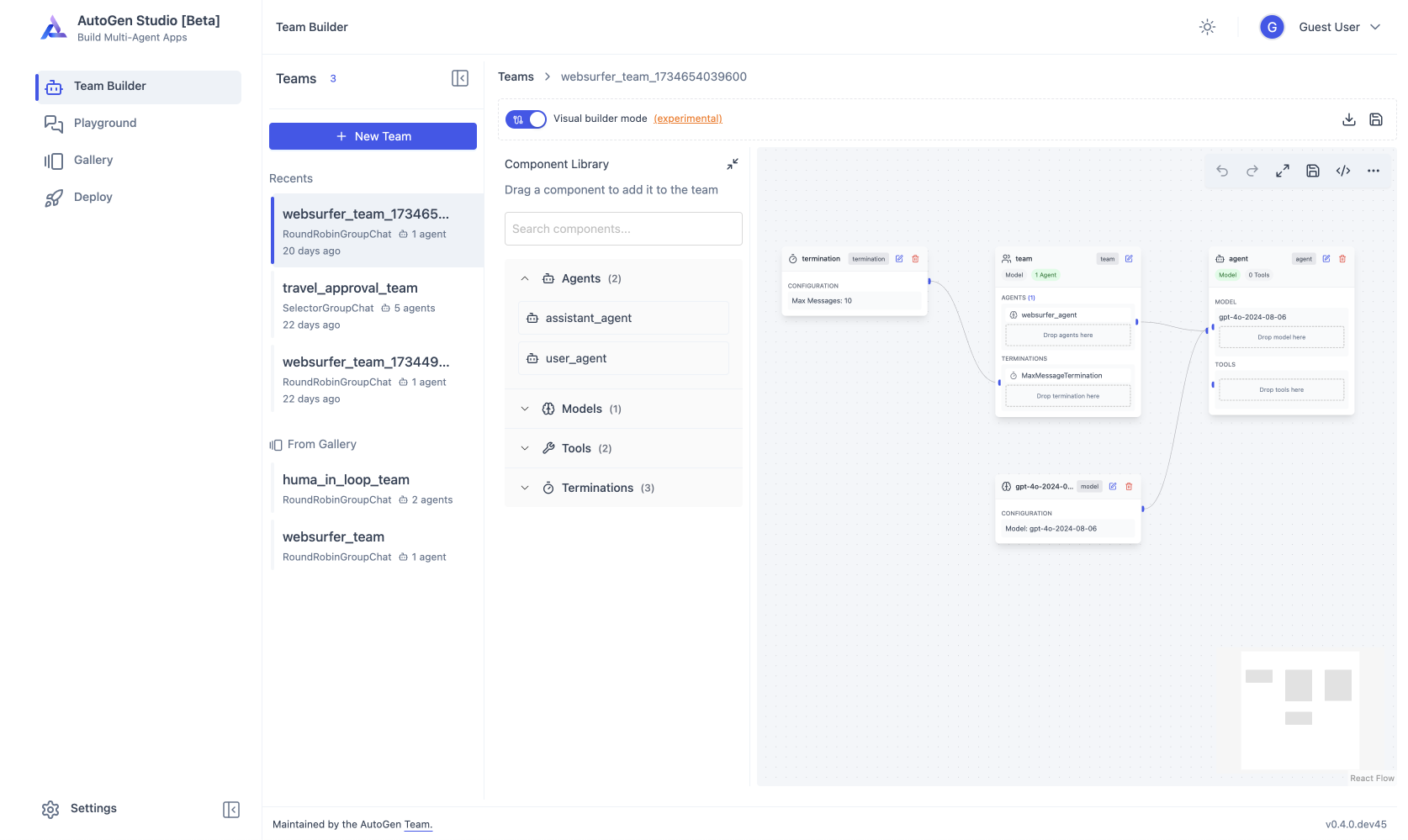
AutoGen Studio Screenshot
  • AutoGen Studio は、マルチエージェントアプリケーションを構築するためのノーコード GUI を提供します。
  • AutoGen Bench は、エージェントのパフォーマンスを評価するためのベンチマーク スイートを提供します。

AutoGen フレームワークと開発者ツールを使用して、ドメイン用のアプリケーションを作成できます。たとえば、Magentic-One は AgentChat API と Extensions API を使用して構築された最先端のマルチエージェント チームで、Web ブラウジング、コード実行、ファイル処理が必要なさまざまなタスクを処理できます。

コミュニティサポートについては、Discord サーバーまたは GitHub Discussions にアクセスしてください。AutoGen は現在コミュニティで管理されており、対応が制限される場合があることに注意してください。

次は何をすればよいですか?

新しいプロジェクトを始めていますか? 最新のマルチエージェント機能と長期サポート向けの Microsoft Agent Framework にアクセスしてください。

既存の AutoGen ユーザーですか? 移行ガイド を使用して移行するか、以下のリソースを参照して現在の AutoGen ドキュメントを確認してください。

Python .NET Studio
インストール インストール インストール インストール
クイックスタート クイックスタート クイックスタート 使用方法
チュートリアル チュートリアル チュートリアル 使用方法
API リファレンス ドキュメント

— GitHub から取得した原文(一部省略の場合あり)

AutoGen Logo

Twitter LinkedIn Discord Documentation Blog

AutoGen Maintenance Mode

AutoGen is a framework for creating multi-agent AI applications that can act autonomously or work alongside humans.

Caution

⚠️ Maintenance Mode

AutoGen is now in maintenance mode. It will not receive new features or enhancements and is community managed going forward.

New users should start with Microsoft Agent Framework. Existing users are encouraged to migrate using the AutoGen → Microsoft Agent Framework migration guide.

Microsoft Agent Framework (MAF) is the enterprise‑ready successor to AutoGen. Microsoft Agent FrameworkAF in now available as a production-ready release: stable APIs, and a commitment to long-term support. Whether you're building a single assistant or orchestrating a fleet of specialized agents, Microsoft Agent Framework 1.0 gives you enterprise-grade multi-agent orchestration, multi-provider model support, and cross-runtime interoperability via A2A and MCP.

Installation

AutoGen requires Python 3.10 or later.

# Install AgentChat and OpenAI client from Extensions
pip install -U "autogen-agentchat" "autogen-ext[openai]"

The current stable version can be found in the releases. If you are upgrading from AutoGen v0.2, please refer to the Migration Guide for detailed instructions on how to update your code and configurations.

# Install AutoGen Studio for no-code GUI
pip install -U "autogenstudio"

Quickstart

The following samples call OpenAI API, so you first need to create an account and export your key as export OPENAI_API_KEY="sk-...".

Hello World

Create an assistant agent using OpenAI's GPT-4o model. See other supported models.

import asyncio
from autogen_agentchat.agents import AssistantAgent
from autogen_ext.models.openai import OpenAIChatCompletionClient

async def main() -> None:
    model_client = OpenAIChatCompletionClient(model="gpt-4.1")
    agent = AssistantAgent("assistant", model_client=model_client)
    print(await agent.run(task="Say 'Hello World!'"))
    await model_client.close()

asyncio.run(main())

MCP Server

Create a web browsing assistant agent that uses the Playwright MCP server.

# First run `npm install -g @playwright/mcp@latest` to install the MCP server.
import asyncio
from autogen_agentchat.agents import AssistantAgent
from autogen_agentchat.ui import Console
from autogen_ext.models.openai import OpenAIChatCompletionClient
from autogen_ext.tools.mcp import McpWorkbench, StdioServerParams


async def main() -> None:
    model_client = OpenAIChatCompletionClient(model="gpt-4.1")
    server_params = StdioServerParams(
        command="npx",
        args=[
            "@playwright/mcp@latest",
            "--headless",
        ],
    )
    async with McpWorkbench(server_params) as mcp:
        agent = AssistantAgent(
            "web_browsing_assistant",
            model_client=model_client,
            workbench=mcp, # For multiple MCP servers, put them in a list.
            model_client_stream=True,
            max_tool_iterations=10,
        )
        await Console(agent.run_stream(task="Find out how many contributors for the microsoft/autogen repository"))


asyncio.run(main())

Warning: Only connect to trusted MCP servers as they may execute commands in your local environment or expose sensitive information.

Multi-Agent Orchestration

You can use AgentTool to create a basic multi-agent orchestration setup.

import asyncio

from autogen_agentchat.agents import AssistantAgent
from autogen_agentchat.tools import AgentTool
from autogen_agentchat.ui import Console
from autogen_ext.models.openai import OpenAIChatCompletionClient


async def main() -> None:
    model_client = OpenAIChatCompletionClient(model="gpt-4.1")

    math_agent = AssistantAgent(
        "math_expert",
        model_client=model_client,
        system_message="You are a math expert.",
        description="A math expert assistant.",
        model_client_stream=True,
    )
    math_agent_tool = AgentTool(math_agent, return_value_as_last_message=True)

    chemistry_agent = AssistantAgent(
        "chemistry_expert",
        model_client=model_client,
        system_message="You are a chemistry expert.",
        description="A chemistry expert assistant.",
        model_client_stream=True,
    )
    chemistry_agent_tool = AgentTool(chemistry_agent, return_value_as_last_message=True)

    agent = AssistantAgent(
        "assistant",
        system_message="You are a general assistant. Use expert tools when needed.",
        model_client=model_client,
        model_client_stream=True,
        tools=[math_agent_tool, chemistry_agent_tool],
        max_tool_iterations=10,
    )
    await Console(agent.run_stream(task="What is the integral of x^2?"))
    await Console(agent.run_stream(task="What is the molecular weight of water?"))


asyncio.run(main())

For more advanced multi-agent orchestrations and workflows, read AgentChat documentation.

AutoGen Studio

Use AutoGen Studio to prototype and run multi-agent workflows without writing code.

Caution: AutoGen Studio is meant to help you rapidly prototype multi-agent workflows and demonstrate an example of end user interfaces built with AutoGen. It is not meant to be a production-ready app. Developers are encouraged to use the AutoGen framework to build their own applications, implementing authentication, security and other features required for deployed applications. See the security note for more details.

# Run AutoGen Studio on http://localhost:8080
autogenstudio ui --port 8080 --appdir ./my-app

Why AutoGen?

AutoGen Landing

Pioneered in Microsoft Research, AutoGen opened the door to experimental multi-agent orchestration patterns that inspired the community. While AutoGen is now in maintenance mode, existing users can continue to use the framework with the architecture described below. For new projects, we recommend Microsoft Agent Framework, which builds on the lessons learned from AutoGen with enterprise-grade support.

The autogen framework uses a layered and extensible design. Layers have clearly divided responsibilities and build on top of layers below. This design enables you to use the framework at different levels of abstraction, from high-level APIs to low-level components.

  • Core API implements message passing, event-driven agents, and local and distributed runtime for flexibility and power. It also support cross-language support for .NET and Python.
  • AgentChat API implements a simpler but opinionated API for rapid prototyping. This API is built on top of the Core API and is closest to what users of v0.2 are familiar with and supports common multi-agent patterns such as two-agent chat or group chats.
  • Extensions API enables first- and third-party extensions continuously expanding framework capabilities. It support specific implementation of LLM clients (e.g., OpenAI, AzureOpenAI), and capabilities such as code execution.

The ecosystem also supports two essential developer tools:

AutoGen Studio Screenshot
  • AutoGen Studio provides a no-code GUI for building multi-agent applications.
  • AutoGen Bench provides a benchmarking suite for evaluating agent performance.

You can use the AutoGen framework and developer tools to create applications for your domain. For example, Magentic-One is a state-of-the-art multi-agent team built using AgentChat API and Extensions API that can handle a variety of tasks that require web browsing, code execution, and file handling.

For community support, visit our Discord server or GitHub Discussions. Note that AutoGen is now community-managed and responses may be limited.

Where to go next?

Starting a new project? Head to Microsoft Agent Framework for the latest multi-agent capabilities with long-term support.

Existing AutoGen user? Use the migration guide to transition, or refer to the resources below for current AutoGen documentation.

Python .NET Studio
Installation Installation Install Install
Quickstart Quickstart Quickstart Usage
Tutorial Tutorial Tutorial Usage
API Reference API RELATED

同じカテゴリの他のツール

AI Agent Hub — AIエージェント / プラグイン情報メディア
日本語訳は AI による自動生成(参考用)。正確な情報は原文を確認してください。



