
AI Agent Hub
AI エージェント / プラグイン情報メディア
← 一覧へ
opencode
OTHER

opencode

opencode

ターミナル向けの AI コーディングエージェント。任意モデルバックエンド対応で、Claude Code 風 UX を OSS で実現することを目指す。

原文: The open source coding agent.
#CLI#TUI
REPO STATS

リポジトリ統計

⭐ Stars
156.2k
🍴 Forks
18.1k
⚠️ Open Issues
6367
🌿 Language
TypeScript
📄 License
MIT
🕒 最終更新
2026.05.07 (今日)
📅 公開日
2025.05.01
🌿 Branch
dev
README

ドキュメント

— AI による自動翻訳 (2026.05.07 更新)

OpenCode logo

オープンソースの AI コーディングエージェント。

Discord npm Build status

English | 简体中文 | 繁體中文 | 한국어 | Deutsch | Español | Français | Italiano | Dansk | 日本語 | Polski | Русский | Bosanski | العربية | Norsk | Português (Brasil) | ไทย | Türkçe | Українська | বাংলা | Ελληνικά | Tiếng Việt
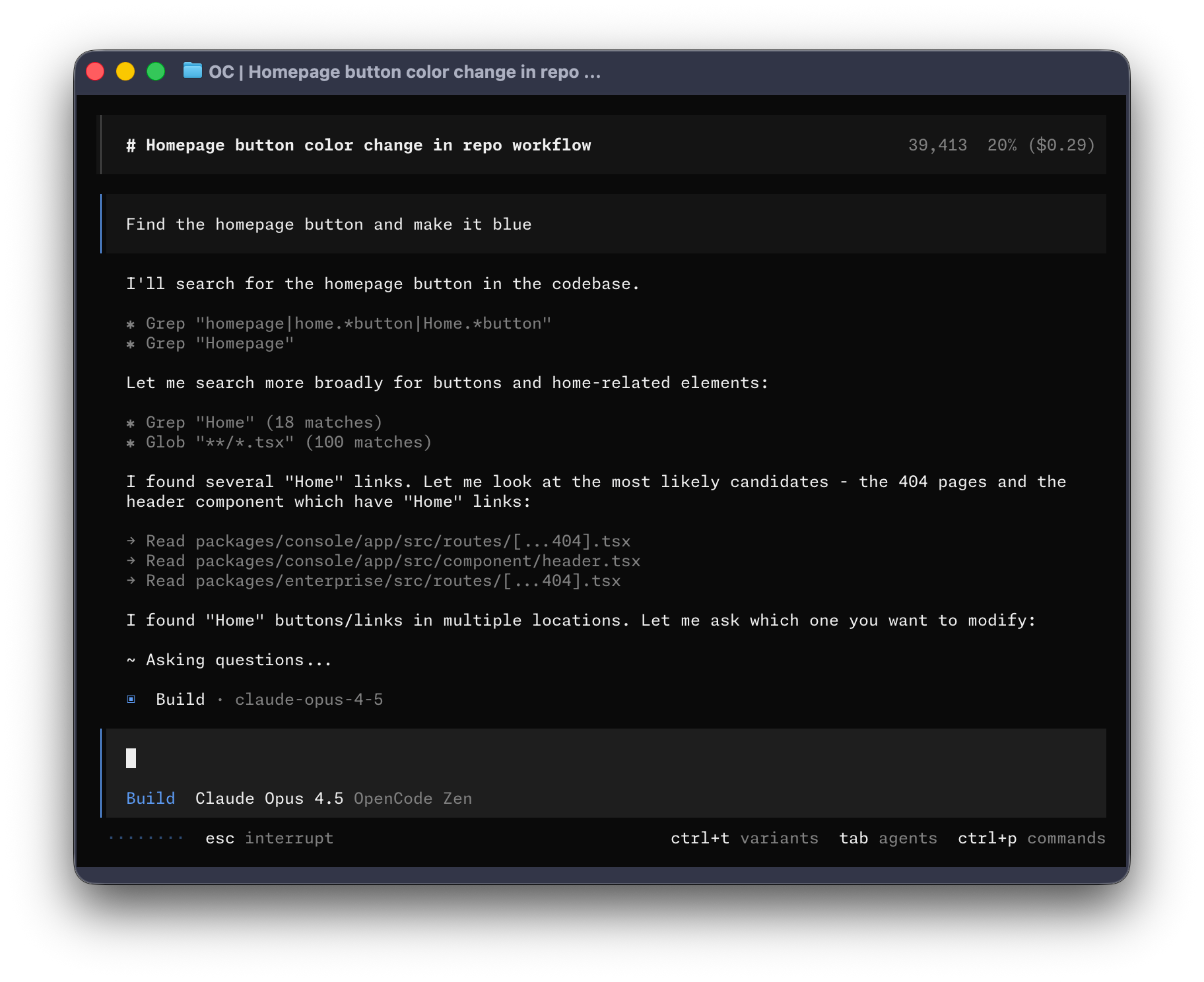
OpenCode Terminal UI


インストール

# YOLO
curl -fsSL https://opencode.ai/install | bash

# Package managers
npm i -g opencode-ai@latest        # or bun/pnpm/yarn
scoop install opencode             # Windows
choco install opencode             # Windows
brew install anomalyco/tap/opencode # macOS and Linux (recommended, always up to date)
brew install opencode              # macOS and Linux (official brew formula, updated less)
sudo pacman -S opencode            # Arch Linux (Stable)
paru -S opencode-bin               # Arch Linux (Latest from AUR)
mise use -g opencode               # Any OS
nix run nixpkgs#opencode           # or github:anomalyco/opencode for latest dev branch

ヒント

インストール前に 0.1.x より古いバージョンをアンインストールしてください。

デスクトップアプリ(ベータ版)

OpenCode はデスクトップアプリケーションとしても利用できます。リリースページまたは opencode.ai/download から直接ダウンロードできます。

プラットフォーム ダウンロード
macOS (Apple Silicon) opencode-desktop-mac-arm64.dmg
macOS (Intel) opencode-desktop-mac-x64.dmg
Windows opencode-desktop-windows-x64.exe
Linux .deb.rpm、または .AppImage
# macOS (Homebrew)
brew install --cask opencode-desktop
# Windows (Scoop)
scoop bucket add extras; scoop install extras/opencode-desktop

インストールディレクトリ

インストールスクリプトはインストールパスについて以下の優先順位を尊重します:

  1. $OPENCODE_INSTALL_DIR - カスタムインストールディレクトリ
  2. $XDG_BIN_DIR - XDG Base Directory Specification に準拠したパス
  3. $HOME/bin - 標準ユーザーバイナリディレクトリ(存在する場合または作成可能な場合)
  4. $HOME/.opencode/bin - デフォルトフォールバック
# Examples
OPENCODE_INSTALL_DIR=/usr/local/bin curl -fsSL https://opencode.ai/install | bash
XDG_BIN_DIR=$HOME/.local/bin curl -fsSL https://opencode.ai/install | bash

エージェント

OpenCode には Tab キーで切り替えることができる 2 つの組み込みエージェントが含まれています。

  • build - デフォルトの開発作業用フルアクセスエージェント
  • plan - 分析とコード探索用の読み取り専用エージェント
    • デフォルトではファイル編集を拒否します
    • bash コマンド実行前に許可を求めます
    • 未知のコードベース探索や変更計画に最適です

複雑な検索とマルチステップタスク用の general サブエージェントも含まれています。 これは内部的に使用され、メッセージで @general を使用して呼び出すことができます。

エージェント についてさらに学ぶ。

ドキュメント

OpenCode の設定方法の詳細については、ドキュメントをご覧ください

貢献

OpenCode への貢献に興味がある場合は、プルリクエストを送信する前に 貢献ガイド をお読みください。

OpenCode で構築する

OpenCode に関連するプロジェクトを開発しており、「opencode-dashboard」や「opencode-mobile」など、その名前の一部に「opencode」を使用している場合は、OpenCode チームによって構築されたものではなく、いかなる形でも私たちと関連がないことを明確にするために、README に注記を追加してください。

よくある質問

Claude Code とはどう違いますか?

機能面では Claude Code と非常に似ていますが、以下が主な違いです。

  • 100% オープンソース
  • 特定のプロバイダーに依存していません。OpenCode Zen で提供するモデルをお勧めしていますが、OpenCode は Claude、OpenAI、Google、またはローカルモデルでも使用できます。モデルが進化するにつれて、それらの差は縮まり、価格は低下するため、プロバイダーに依存しないことが重要です。
  • 組み込みのオプトイン LSP サポート
  • TUI へのフォーカス。OpenCode は neovim ユーザーと terminal.shop の作成者によって構築されています。私たちはターミナルで可能なことの限界を押し広げようとしています。
  • クライアント/サーバーアーキテクチャです。これにより、たとえば OpenCode をコンピュータ上で実行しながら、モバイルアプリからリモートで操作することができます。つまり、TUI フロントエンドは可能なクライアントの 1 つに過ぎません。

コミュニティに参加する Discord | X.com

— GitHub から取得した原文(一部省略の場合あり)

OpenCode logo

The open source AI coding agent.

Discord npm Build status

English | 简体中文 | 繁體中文 | 한국어 | Deutsch | Español | Français | Italiano | Dansk | 日本語 | Polski | Русский | Bosanski | العربية | Norsk | Português (Brasil) | ไทย | Türkçe | Українська | বাংলা | Ελληνικά | Tiếng Việt

OpenCode Terminal UI


Installation

# YOLO
curl -fsSL https://opencode.ai/install | bash

# Package managers
npm i -g opencode-ai@latest        # or bun/pnpm/yarn
scoop install opencode             # Windows
choco install opencode             # Windows
brew install anomalyco/tap/opencode # macOS and Linux (recommended, always up to date)
brew install opencode              # macOS and Linux (official brew formula, updated less)
sudo pacman -S opencode            # Arch Linux (Stable)
paru -S opencode-bin               # Arch Linux (Latest from AUR)
mise use -g opencode               # Any OS
nix run nixpkgs#opencode           # or github:anomalyco/opencode for latest dev branch

Tip

Remove versions older than 0.1.x before installing.

Desktop App (BETA)

OpenCode is also available as a desktop application. Download directly from the releases page or opencode.ai/download.

Platform Download
macOS (Apple Silicon) opencode-desktop-mac-arm64.dmg
macOS (Intel) opencode-desktop-mac-x64.dmg
Windows opencode-desktop-windows-x64.exe
Linux .deb, .rpm, or .AppImage
# macOS (Homebrew)
brew install --cask opencode-desktop
# Windows (Scoop)
scoop bucket add extras; scoop install extras/opencode-desktop

Installation Directory

The install script respects the following priority order for the installation path:

  1. $OPENCODE_INSTALL_DIR - Custom installation directory
  2. $XDG_BIN_DIR - XDG Base Directory Specification compliant path
  3. $HOME/bin - Standard user binary directory (if it exists or can be created)
  4. $HOME/.opencode/bin - Default fallback
# Examples
OPENCODE_INSTALL_DIR=/usr/local/bin curl -fsSL https://opencode.ai/install | bash
XDG_BIN_DIR=$HOME/.local/bin curl -fsSL https://opencode.ai/install | bash

Agents

OpenCode includes two built-in agents you can switch between with the Tab key.

  • build - Default, full-access agent for development work
  • plan - Read-only agent for analysis and code exploration
    • Denies file edits by default
    • Asks permission before running bash commands
    • Ideal for exploring unfamiliar codebases or planning changes

Also included is a general subagent for complex searches and multistep tasks. This is used internally and can be invoked using @general in messages.

Learn more about agents.

Documentation

For more info on how to configure OpenCode, head over to our docs.

Contributing

If you're interested in contributing to OpenCode, please read our contributing docs before submitting a pull request.

Building on OpenCode

If you are working on a project that's related to OpenCode and is using "opencode" as part of its name, for example "opencode-dashboard" or "opencode-mobile", please add a note to your README to clarify that it is not built by the OpenCode team and is not affiliated with us in any way.

FAQ

How is this different from Claude Code?

It's very similar to Claude Code in terms of capability. Here are the key differences:

  • 100% open source
  • Not coupled to any provider. Although we recommend the models we provide through OpenCode Zen, OpenCode can be used with Claude, OpenAI, Google, or even local models. As models evolve, the gaps between them will close and pricing will drop, so being provider-agnostic is important.
  • Built-in opt-in LSP support
  • A focus on TUI. OpenCode is built by neovim users and the creators of terminal.shop; we are going to push the limits of what's possible in the terminal.
  • A client/server architecture. This, for example, can allow OpenCode to run on your computer while you drive it remotely from a mobile app, meaning that the TUI frontend is just one of the possible clients.

Join our community Discord | X.com

RELATED

同じカテゴリの他のツール


