AI Agent Hub
AI エージェント / プラグイン情報メディア
← 一覧へ
SuperAGI
OTHER

SuperAGI

SuperAGI

GUI 付きの自律エージェント開発プラットフォーム。並列実行・ループ抑制・パフォーマンス分析などエンタープライズ向け運用機能を備える。

原文: <⚡️> SuperAGI - A dev-first open source autonomous AI agent framework. Enabling developers to build, manage & run useful autonomous agents quickly and reliably.
#プラットフォーム#GUI#自律エージェント#agents#agi#ai#artificial-general-intelligence#artificial-intelligence#autonomous-agents#gpt-4#hacktoberfest#llm
REPO STATS

リポジトリ統計

⭐ Stars
17.5k
🍴 Forks
2.2k
⚠️ Open Issues
253
🌿 Language
Python
📄 License
MIT
🕒 最終更新
2025.01.23 (1年前)
📅 公開日
2023.05.13
🌿 Branch
main
README

ドキュメント

— AI による自動翻訳 (2026.05.07 更新)

SuperAGI logo SuperAGI logo

有用な自律型AI エージェントを構築、管理、実行するためのオープンソースフレームワーク

SuperAGI forks SuperAGI stars SuperAGI Commits

SuperAGI をフォロー

Follow _superAGI Join SuperAGI Discord Community

クリエイターに接続

Follow ishaanbhola

SuperAGI リポジトリを共有

Follow _superAGI Share on Telegram Share on Reddit Buy Me A Coffee


私たちとは?

開発者向けのオープンソース自律型 AI エージェントフレームワークで、開発者が有用な自律型エージェントを構築、管理、実行できます。複数のエージェントをシームレスに実行でき、ツールを使ってエージェントの機能を拡張できます。エージェントは様々なタスクを効率的に実行でき、実行するたびにパフォーマンスを継続的に改善します。

💡 機能

  • 自律型 AI エージェントのプロビジョニング、生成、デプロイ - 本番環境対応でスケーラブルな自律型エージェントを作成できます。
  • ツールキットでエージェント機能を拡張 - マーケットプレイスからツールキットを追加して、エージェントワークフローを拡張できます。
  • グラフィカルユーザーインターフェース - グラフィカルユーザーインターフェースを通じてエージェントにアクセスできます。
  • アクション コンソール - 入力とパーミッションを与えることでエージェントと対話できます。
  • 複数のベクター DB - 複数のベクター DB に接続してエージェントのパフォーマンスを向上できます。
  • パフォーマンステレメトリ - エージェントのパフォーマンスについて洞察を得て、それに応じて最適化できます。
  • 最適化されたトークン使用量 - トークン使用量を制御してコストを効果的に管理できます。
  • エージェント メモリ ストレージ - メモリを保存してエージェントが学習・適応できるようにします。
  • モデル - ビジネス固有のユースケース向けのカスタムチューニング済みモデルです。
  • ワークフロー - ReAct LLM の定義済みステップを使用してタスクを簡単に自動化できます。

🛠 Toolkits

Toolkits により、SuperAGI Agents は外部システムおよびサードパーティプラグインと相互作用することができます。

Twitter Coding Tool Instagram Knowledge Search Email Jira File Manager Google Search Dall-E Github Web Interaction Duckduckgo Google Calendar Google Calendar Serp API Searx Web Scraper Notion Apollo

⚙️ インストール

SuperAGI は以下の 3 つの方法のいずれかを使用してインストールできます。

☁️ SuperAGI Cloud

システムのセットアップの手間を避けて、エージェントで素早く実験を始めるには、Superagi Cloud をお試しください。

  1. Superagi Cloud にアクセスして、GitHub アカウントを使ってログインしてください。

  2. アカウント設定で「Model Providers」に移動し、API キーを追加します。

これで完了です。エージェントを簡単に実行を開始できます。

🖥️ ローカル

  1. ターミナルを開いて、SuperAGI リポジトリをクローンしてください。
git clone https://github.com/TransformerOptimus/SuperAGI.git 
  1. クローンしたリポジトリディレクトリに移動してください:
cd SuperAGI
  1. config_template.yaml のコピーを作成し、config.yaml という名前にします。

  2. Docker がシステムにインストールされていることを確認してください。ここ からダウンロードしてインストールできます。

  3. Docker Desktop が起動したら、SuperAGI ディレクトリで以下のコマンドを実行してください:

    a. 通常の使用方法:

    docker compose -f docker-compose.yaml up --build
    

    b. SuperAGI をローカル LLM で GPU と共に使用したい場合は、以下のコマンドを実行してください:

    docker compose -f docker-compose-gpu.yml up --build
    
  4. Web ブラウザを開いて、http://localhost:3000 に移動して SuperAGI にアクセスしてください。

🌀 Digital Ocean


ワンクリックで SuperAGI を DigitalOcean にデプロイしてください。

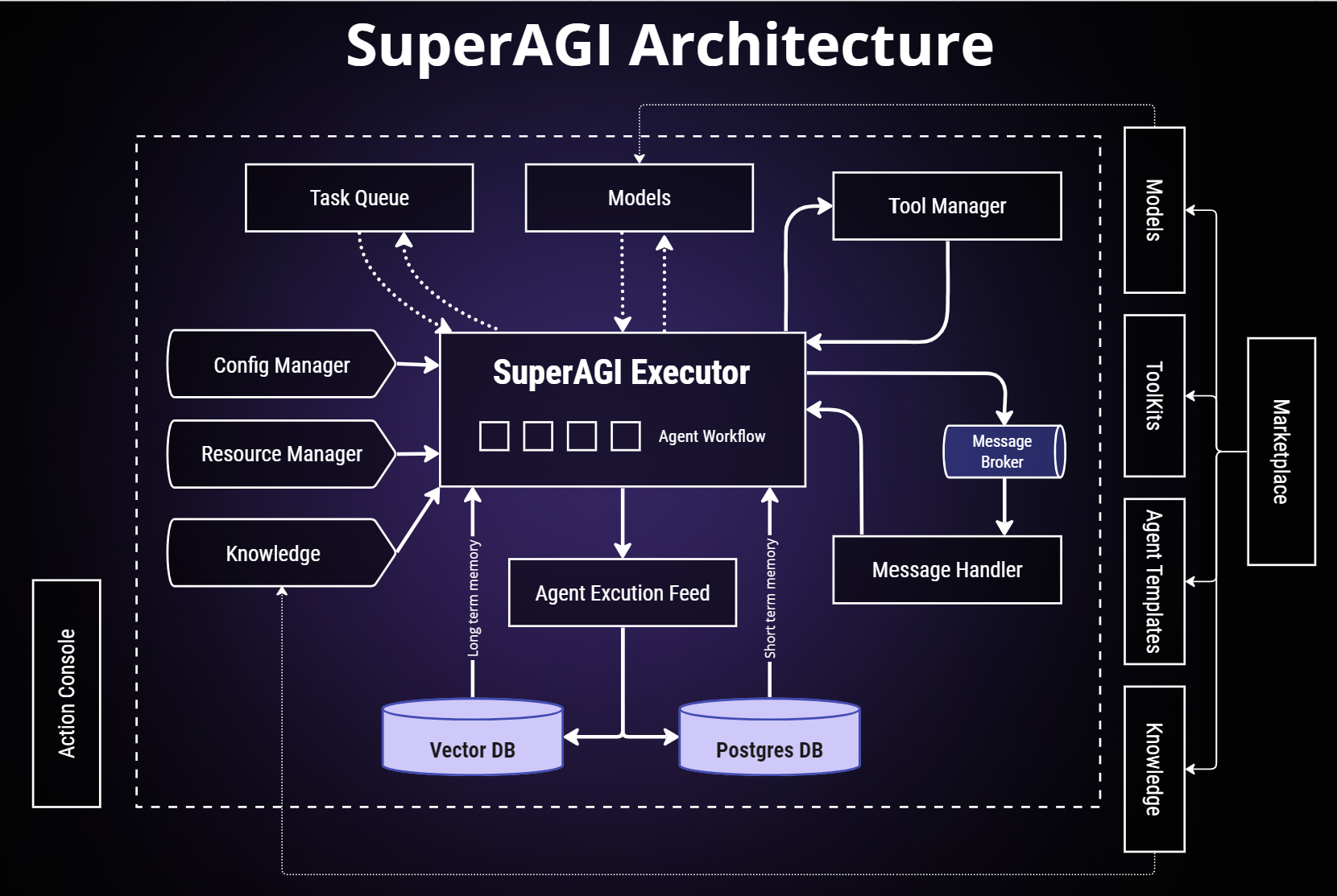
SuperAGI アーキテクチャ

SuperAGI Architecture

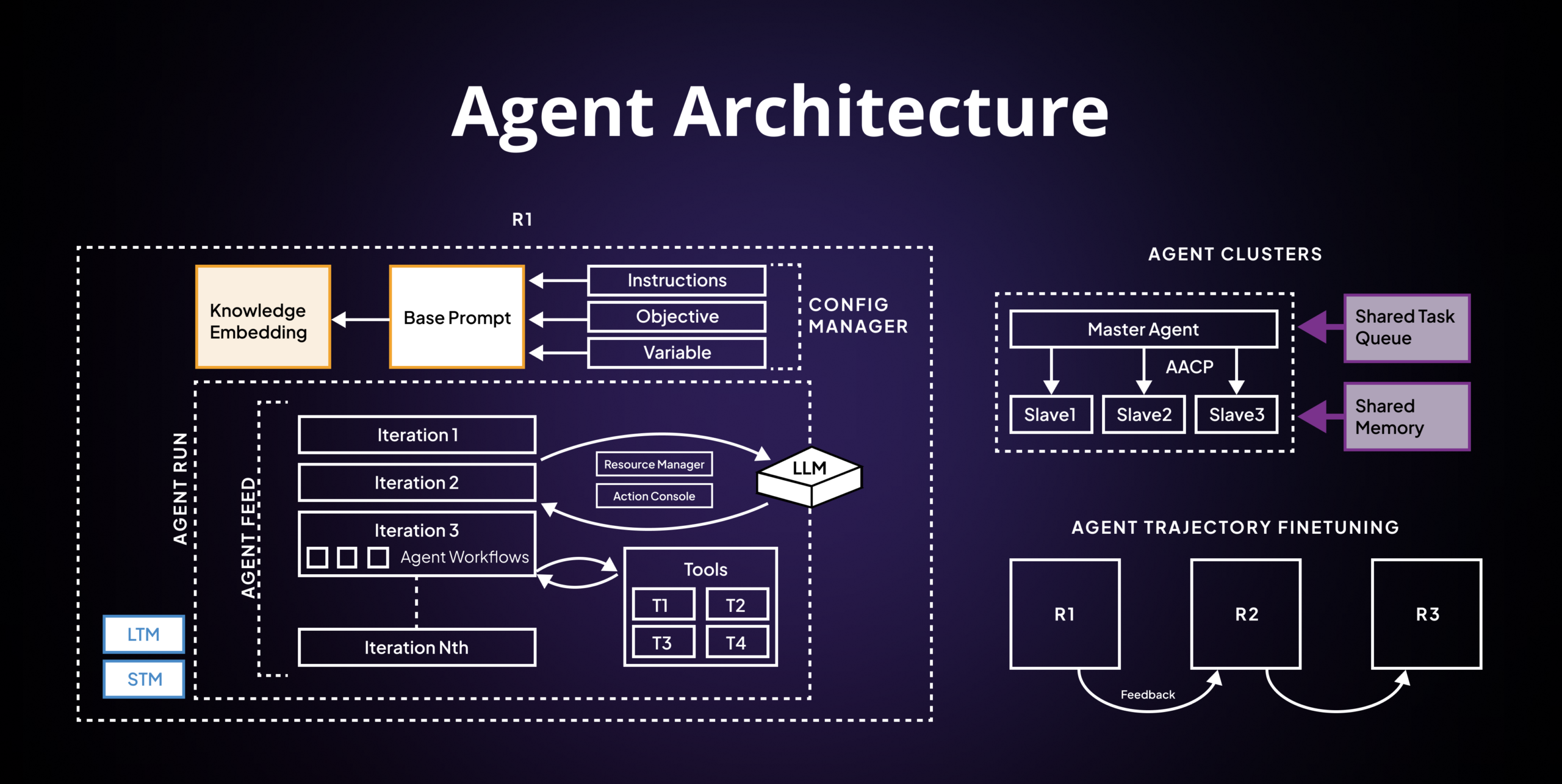
エージェント アーキテクチャ

Agent Architecture

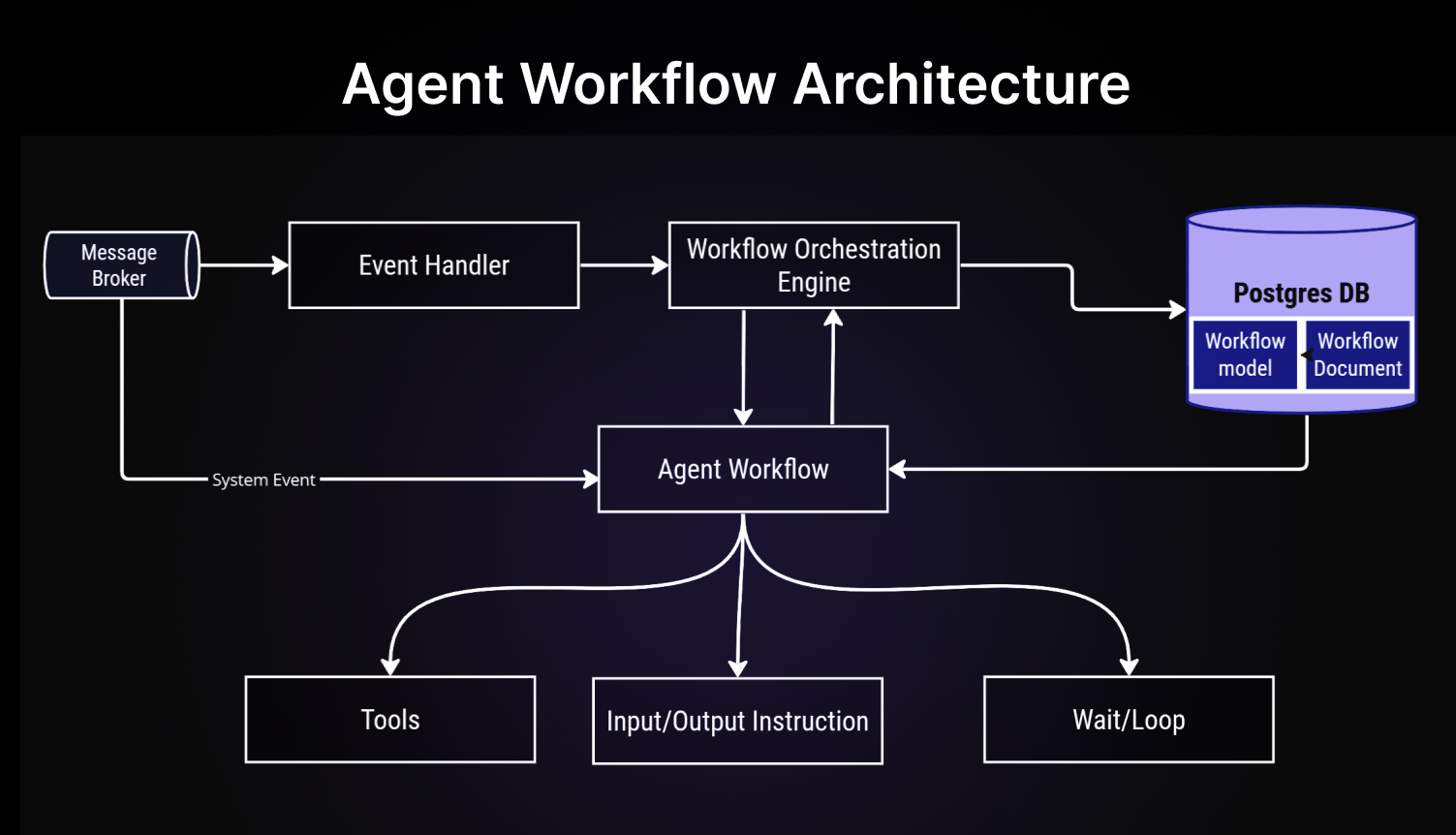
エージェント ワークフロー アーキテクチャ

Agent Workflow Architecture

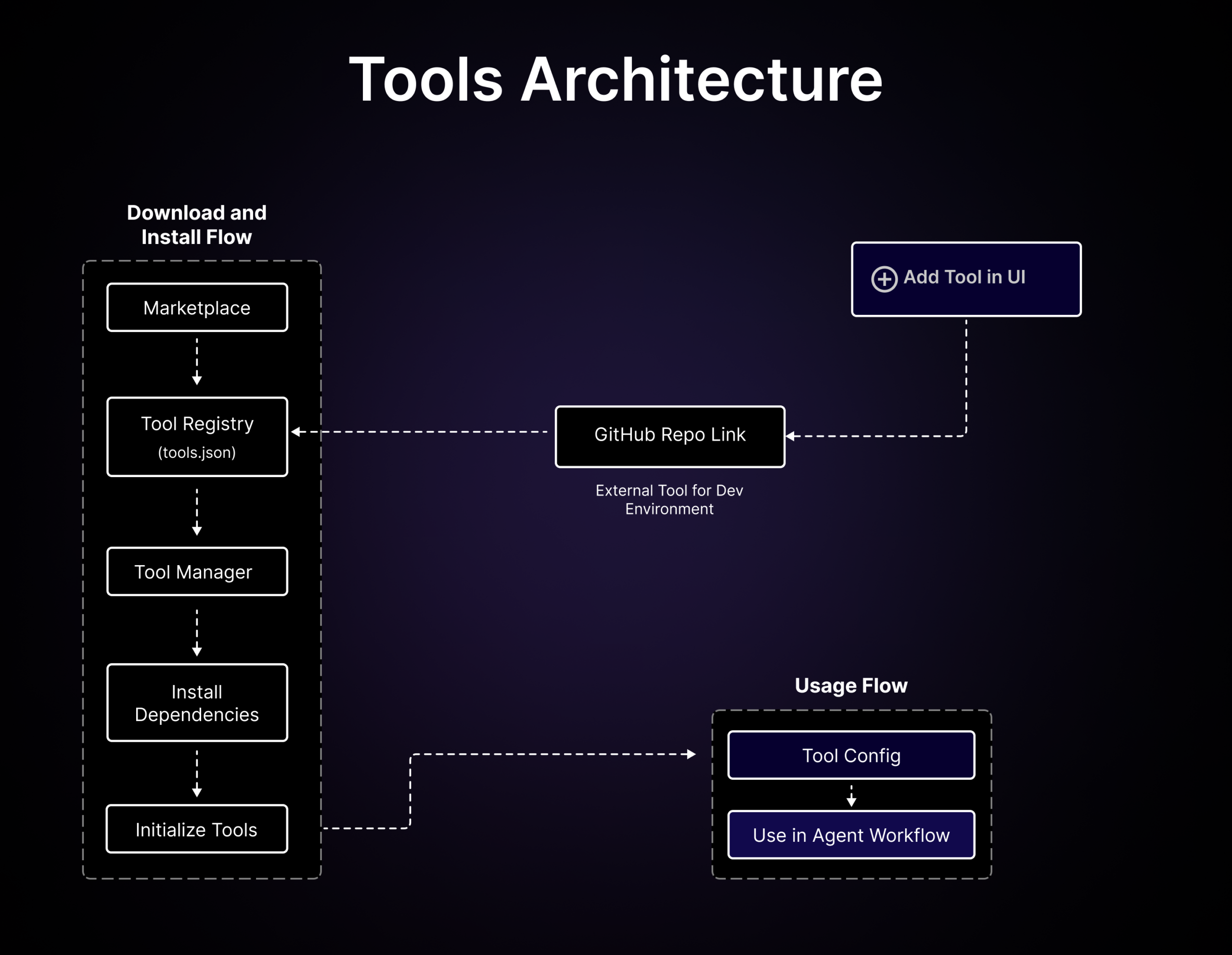
ツール アーキテクチャ

Tools Architecture

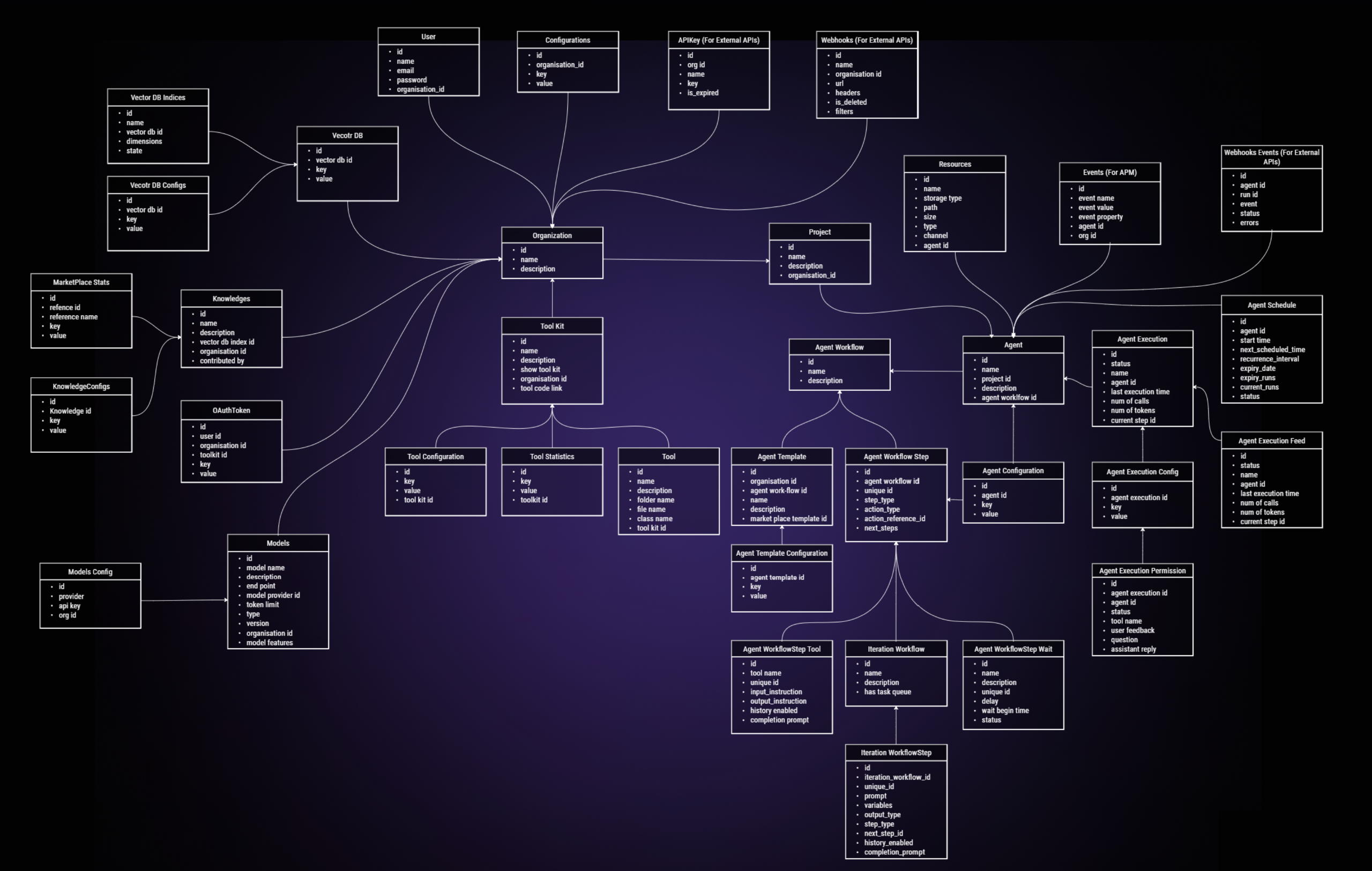
ER 図

ER Diagram

📚 リソース

📖 ヘルプが必要ですか?

— GitHub から取得した原文(一部省略の場合あり)

SuperAGI logo SuperAGI logo

Open-source framework to build, manage and run useful Autonomous AI Agents

SuperAGI forks SuperAGI stars SuperAGI Commits

Follow SuperAGI

Follow _superAGI Join SuperAGI Discord Community

Connect with the Creator

Follow ishaanbhola

Share SuperAGI Repository

Follow _superAGI Share on Telegram Share on Reddit Buy Me A Coffee


What are we ?

A dev-first open source autonomous AI agent framework enabling developers to build, manage & run useful autonomous agents. You can run concurrent agents seamlessly, extend agent capabilities with tools. The agents efficiently perform a variety of tasks and continually improve their performance with each subsequent run.

💡 Features

  • Provision, Spawn & Deploy Autonomous AI Agents - Create production-ready & scalable autonomous agents.
  • Extend Agent Capabilities with Toolkits - Add Toolkits from our marketplace to your agent workflows.
  • Graphical User Interface - Access your agents through a graphical user interface.
  • Action Console - Interact with agents by giving them input and permissions.
  • Multiple Vector DBs - Connect to multiple Vector DBs to enhance your agent’s performance.
  • Performance Telemetry - Get insights into your agent’s performance and optimize accordingly.
  • Optimized Token Usage - Control token usage to manage costs effectively.
  • Agent Memory Storage - Enable your agents to learn and adapt by storing their memory.
  • Models - Custom fine tuned models for business specific usecases.
  • Workflows - Automate tasks with ease using ReAct LLM's predefined steps.

🛠 Toolkits

Toolkits allow SuperAGI Agents to interact with external systems and third-party plugins.

Twitter Coding Tool Instagram Knowledge Search Email Jira File Manager Google Search Dall-E Github Web Interaction Duckduckgo Google Calendar Google Calendar Serp API Searx Web Scraper Notion Apollo

⚙️ Installation

You can install superAGI using one of the following three approaches.

☁️ SuperAGI cloud

To quickly start experimenting with agents without the hassle of setting up the system, try Superagi Cloud

  1. Visit Superagi Cloud and log in using your github account.

  2. In your account settings, go to "Model Providers" and add your API key.

You're all set! Start running your agents effortlessly.

🖥️ Local

  1. Open your terminal and clone the SuperAGI repository.
git clone https://github.com/TransformerOptimus/SuperAGI.git 
  1. Navigate to the cloned repository directory using the command:
cd SuperAGI
  1. Create a copy of config_template.yaml, and name it config.yaml.

  2. Ensure that Docker is installed on your system. You can download and install it from here.

  3. Once you have Docker Desktop running, run the following command in the SuperAGI directory:

    a. For regular usage:

    docker compose -f docker-compose.yaml up --build
    

    b. If you want to use SuperAGI with Local LLMs and have GPU, run the following command:

    docker compose -f docker-compose-gpu.yml up --build
    
  4. Open your web browser and navigate to http://localhost:3000 to access SuperAGI.

🌀 Digital Ocean


Deploy SuperAGI to DigitalOcean with one click.

SuperAGI Architecture

SuperAGI Architecture

Agent Architecture

Agent Architecture

Agent Workflow Architecture

Agent Workflow Architecture

Tools Architecture

Tools Architecture

ER Diagram

ER Diagram

📚 Resources